Real-Time Alerts for Retraining Workflows
Real-time alerts are the backbone of maintaining accurate sports betting models. These alerts notify you immediately when your model's performance drops, helping you address issues like data drift and concept drift in seconds instead of hours. This reduces the financial impact of degraded predictions by 60-80%. Here's what you need to know:
- Why it matters: Sports betting models face constant changes in odds, betting patterns, and team dynamics. Without real-time monitoring, outdated models can lead to poor predictions and losses.
- How it works: Alerts track metrics like accuracy and data distribution. When thresholds are breached, they notify teams or trigger automated retraining workflows.
- Key tools: Platforms like Vertex AI and SageMaker offer built-in monitoring and drift detection. Open-source options like MLRun and Evidently are also available.
- Best practices: Use strict thresholds for sensitive metrics, automate retraining only when necessary, and validate new models before deployment.
Automate ML Retraining with Drift Detection | MLOps Project #machinelearning #ai
How to Set Up Real-Time Alerts
Real-Time Alert System Setup for ML Model Monitoring
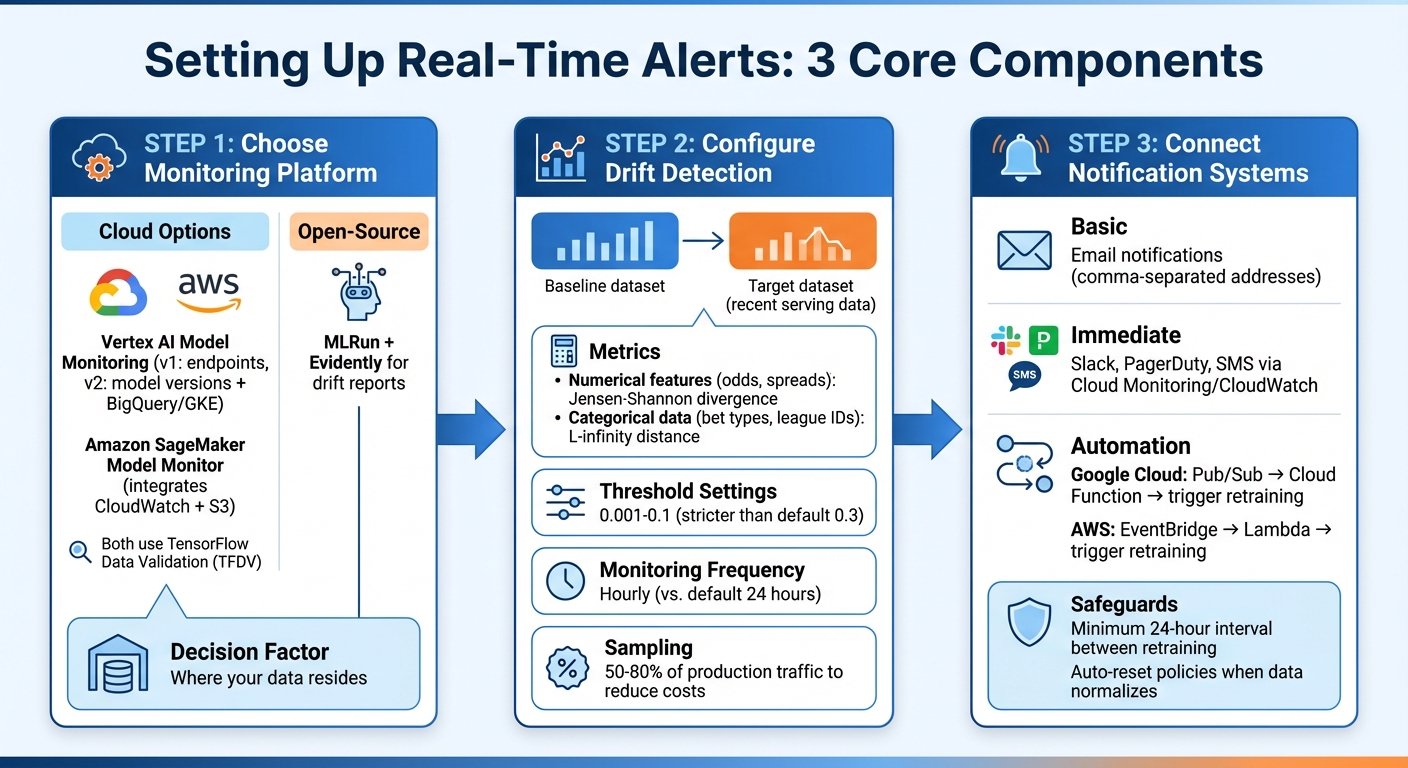
Creating real-time alerts requires three main components: a monitoring platform, drift detection mechanisms, and notification channels. The first step is to select a monitoring tool that works seamlessly with your data infrastructure.
Monitoring and Alert Tools
Cloud-native tools like Vertex AI Model Monitoring and Amazon SageMaker Model Monitor are excellent options for tracking production model performance. Vertex AI offers two versions: v1, which monitors endpoints, and v2, which is in preview (as of February 2026). The newer version links monitoring to specific model versions and supports a wider range of data sources, including BigQuery, Google Kubernetes Engine, and external infrastructure. On the other hand, SageMaker integrates with Amazon CloudWatch and S3, enabling logging of prediction requests and anomaly analysis. Both platforms utilize TensorFlow Data Validation (TFDV) to calculate statistical distributions and detect deviations.
For sports betting applications, these tools can continuously analyze data like odds, spreads, and betting volumes against baseline datasets. If you're looking for an open-source option, MLRun integrates with Evidently to generate detailed drift reports.
The choice of platform depends on where your data resides. For instance, if your prediction logs are stored in BigQuery, Vertex AI v2 can directly access those tables. If your models run on AWS, SageMaker's integration with S3 and CloudWatch makes setup easier. Once your monitoring system is in place, you can configure drift detection to measure data changes effectively.
Setting Up Drift Detection
Drift detection compares two datasets: a baseline (e.g., historical production or training data) and a target (recent serving data). By calculating the statistical distance between these datasets, you can identify when the data your model is processing significantly diverges from what it was trained on.
For numerical features like odds and spreads, use Jensen-Shannon divergence to measure changes. For categorical data, such as bet types or league IDs, L-infinity distance works well to track shifts in category frequencies. These metrics are essential for determining when to retrain your model, ensuring it remains accurate in fast-changing betting environments.
Set stricter alert thresholds for sensitive metrics - values between 0.001 and 0.1 are recommended, instead of default settings like 0.3. Monitoring frequency should also align with market dynamics. For instance, Vertex AI allows hourly monitoring, though the default is every 24 hours. Hourly checks are particularly useful for quickly detecting discrepancies. In high-traffic scenarios, sampling a percentage of production traffic (e.g., 50% to 80%) can help reduce costs while still providing meaningful insights.
Connecting Alerts to Notification Systems
To ensure timely responses, route drift alerts to channels that can either notify your team or automate workflows. The simplest setup involves email notifications - most platforms allow you to input multiple email addresses separated by commas. For more immediate messaging, integrate with tools like Slack, PagerDuty, or SMS using Cloud Monitoring or CloudWatch.
For automation, middleware tools such as Pub/Sub (Google Cloud) or EventBridge (AWS) can link your monitoring service to downstream systems. For example, a Cloud Function can process alerts and trigger retraining workflows when critical thresholds are breached. This setup ensures that serious drift events are addressed quickly, while minor fluctuations don’t overwhelm your team with unnecessary alerts.
To avoid redundant retraining, set a minimum interval of 24 hours for automation triggers. You can also configure auto-reset policies to stop notifications once data returns to normal ranges. These measures help maintain balance - addressing major issues promptly without creating alert fatigue.
Connecting Alerts to Retraining Pipelines
Integrating drift alerts with retraining workflows turns passive monitoring into an active system maintenance strategy.
Activating Automated Retraining
Event-driven retraining offers a smarter alternative to scheduled updates by responding to real data changes. Nawaz Dhandala from OneUptime highlights its efficiency: triggering retraining only when meaningful data drift occurs avoids wasting resources on unnecessary updates.
For example, on Google Cloud Platform, you can link Vertex AI Model Monitoring to Cloud Functions using Pub/Sub. When drift surpasses a set threshold, the monitoring service publishes an event. A Cloud Function then evaluates the situation and activates Vertex AI Pipelines if retraining is needed . AWS provides a similar setup by combining SageMaker Model Monitor, EventBridge, and Lambda for automated workflows.
To avoid over-triggering, enforce a minimum 24-hour gap between retraining sessions and require drift in multiple features before initiating retraining. Tools like Prefect allow you to set combined conditions, ensuring pipelines activate only under specific criteria. Start with conservative thresholds to gauge your model's sensitivity, then fine-tune them based on performance. These safeguards are especially critical in fast-changing industries like sports betting, where accuracy is key.
Validating Models Before Deployment
Retraining alone doesn’t guarantee better performance. Every retraining pipeline should include a validation step to compare the updated model against the production version. Only deploy the new model if it meets or exceeds performance benchmarks.
For instance, a Vertex AI Pipeline can use a compare_with_production component to assess metrics like accuracy and F1-score. Deployment is triggered only if the retrained model demonstrates at least a 1% improvement over the current production model. Once deployed, the pipeline automatically runs an update_monitoring_baseline task to recalibrate drift detection based on the new training data.
This "champion-challenger" approach ensures only superior models replace the existing ones. In sports betting, validating models across multiple metrics - such as F1-scores for specific bets, mean absolute error for spread predictions, or AUC for probability estimates - provides a more comprehensive evaluation than relying solely on accuracy. Storing these metrics as metadata in your model registry simplifies automated comparisons. Additionally, updating the monitoring baseline ensures future drift detection aligns with the latest training data.
Best Practices for Sports Betting Alert Systems
Effective alert systems in sports betting strike a balance between quick responses and managing costs.
Managing Costs and Response Times
Real-time alerts are incredibly responsive but come with hefty computing costs. As one source explains, "Real-time alerts can be costly in terms of computing resources, so consider using a scheduled alert when possible". While real-time alerts can reduce incident impact by 60–80% and improve resolution times by 75%, these benefits often demand greater infrastructure investment.
To manage costs effectively, it's crucial to align alert frequency with your business needs. For example, per-result triggering uses fewer resources compared to rolling window triggering, which continuously processes data streams. The urgency of the situation also matters - business anomalies might tolerate up to a 10-second delay, but live odds outages often require a response in under 2 seconds.
Another way to save resources is by focusing on the most critical metrics rather than monitoring every feature in your model. Tracking only the top N features reduces computational overhead and eliminates unnecessary noise. Additionally, sampling around 80% of the data can help cut processing costs without sacrificing too much accuracy. These strategies not only reduce costs but also lay the groundwork for better feedback loops, which are essential for improving system performance.
Building Feedback Loops
Once costs are under control, the next step is refining alert systems through feedback loops. Static thresholds, while simple, can quickly become outdated as data patterns shift. For instance, "Static alert thresholds rot. You set error_rate > 1% as a threshold during launch, traffic patterns shift over the next six months, and now that threshold fires every Friday afternoon during a predictable traffic spike". Feedback loops help address this issue by categorizing alerts into true positives (real incidents), false positives (dismissed alerts), and missed incidents (issues discovered through other means).
To keep alerts relevant, use historical percentile baselines to automatically adjust thresholds as patterns change. Hysteresis rules can also help by preventing alerts from triggering due to brief, insignificant fluctuations, instead activating only after sustained deviations. If false positives exceed 30%, the system can recommend raising thresholds to reduce unnecessary noise. This continuous refinement is especially important in sports betting, where accurate, timely adjustments are crucial for maintaining system reliability and performance.
Key Takeaways
Here’s a summary of the key points from our guide:
Real-time alerts serve as the nervous system of a machine learning pipeline, transforming monitoring signals into automated actions that help maintain model accuracy in rapidly changing environments. As Mohtasham Sayeed Mohiuddin from Confluent explains, "Real-time alerts represent the foundation of autonomous business systems - enabling organizations to respond to opportunities and threats at machine speed while maintaining human oversight for complex decisions".
Event-driven retraining ensures models are updated immediately when performance drops or data patterns shift, minimizing incident impact by 60–80% and slashing resolution times by 75%. This means organizations can address anomalies in seconds instead of hours.
For sports betting models, a combination of threshold-based alerts (e.g., when accuracy dips below 80%) and event-based triggers (like the start of a major tournament) provides a safety net against both sudden disruptions and gradual performance decline. By focusing monitoring on critical features rather than tracking every single metric, you can also significantly lower computational costs and reduce unnecessary noise.
As emphasized earlier in the guide, automated retraining must always include rigorous model validation before deployment. Even strong retraining metrics can sometimes produce models that underperform compared to the current production version. Establishing improvement thresholds - such as requiring a new model to show at least a 1% accuracy boost over its predecessor - ensures that only worthwhile updates are rolled out automatically.
FAQs
What’s the difference between data drift and concept drift?
Data drift happens when the distribution of input features in production shifts from what the model was trained on. This could mean changes in feature values or how those values are distributed. On the other hand, concept drift occurs when the relationship between input features and the target variable changes. When this happens, the model's understanding of the problem becomes outdated. Both types of drift can hurt model performance if they aren't monitored and dealt with properly.
How do I set alert thresholds without causing alert fatigue?
To keep alert fatigue at bay, it’s crucial to set thresholds that strike a balance between being sensitive enough to catch real issues and reducing unnecessary noise. Dive into historical data and use statistical analysis to fine-tune these thresholds, helping to cut down on false positives. Also, establish a feedback loop to regularly review past alerts and tweak your settings as needed. This approach ensures alerts stay meaningful and actionable, while cutting down on the distractions caused by excessive notifications.
When should an alert trigger retraining vs just notify my team?
When should you retrain your model? Alerts are your signal for action. They should activate when there are clear signs of performance slipping or when the input data has shifted significantly - like a major change in data patterns.
On the flip side, notifications are more of a heads-up. They’re ideal for smaller anomalies or routine updates that don’t demand immediate attention. The trick is knowing the difference: if accuracy takes a hit or critical changes emerge, retraining is necessary. For less pressing issues, a simple team update will suffice.
Related Blog Posts
Ready to bet smarter?
WagerProof uses real data and advanced analytics to help you make informed betting decisions. Get access to professional-grade predictions for NFL, College Football, and more.
Get Started Free